
Fragmented Notes, One-Click Copy
Built for developers and productivity enthusiasts. Keep frequently used commands, code snippets, and fragmented knowledge organized—copy on demand without tedious text selection.
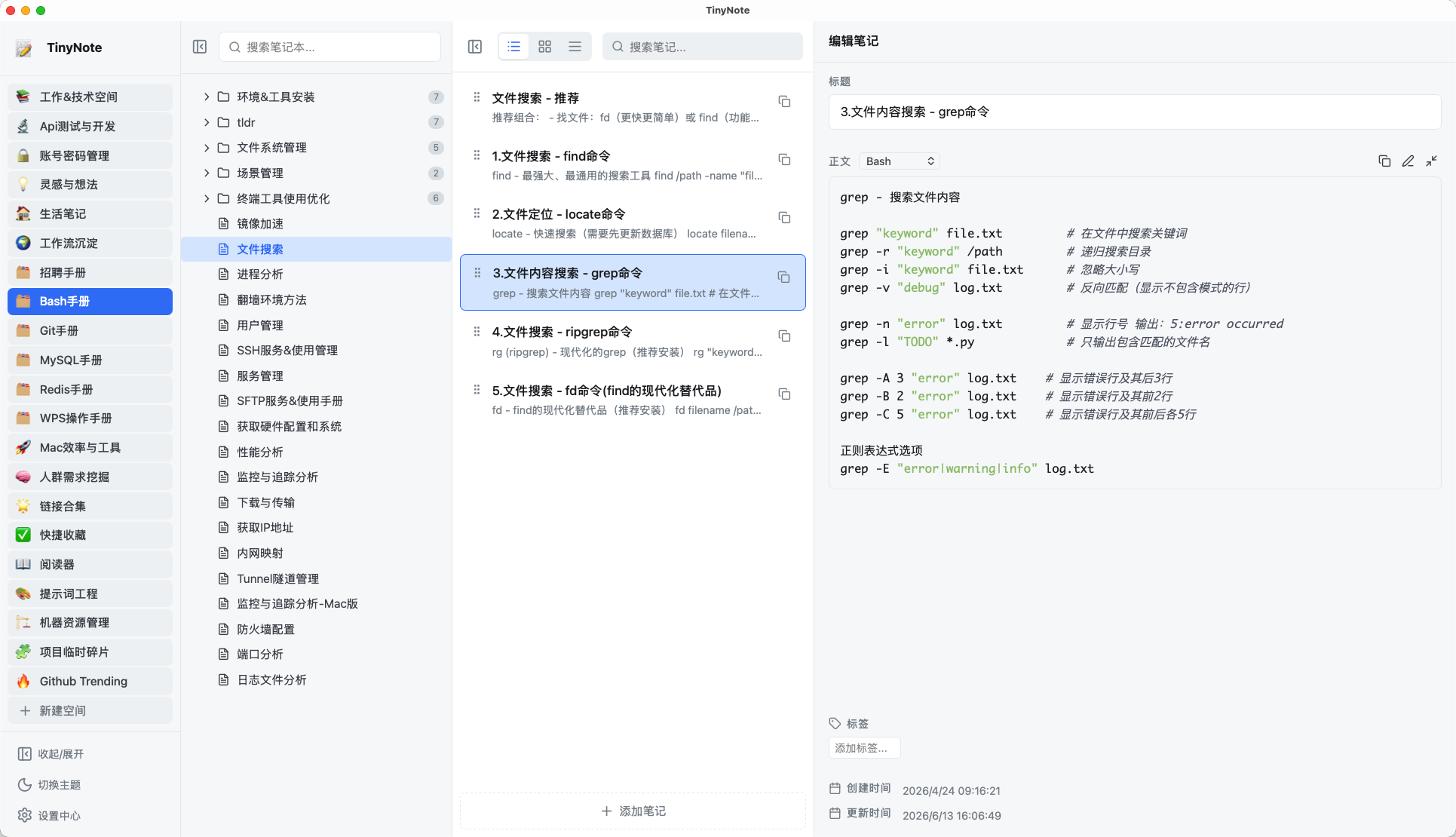
Lightweight & Fast, Built for Frequent Copying
Compact size, instant startup, rapid search—plus one-click copy to make knowledge retrieval effortless.
5~10MB Lightweight Package
Built on Tauri with an installer of only ~5–10MB. No bloated runtime, instant install, and negligible memory footprint.
Instant Startup
Native desktop performance with zero startup wait. Whenever you need to look up a command or snippet, it's instantly ready.
Fast Search
Built-in search across both directory and notes list. Pinpoint blocks among thousands and copy immediately.
One-Click Quick Copy
Dedicated copy button on every note block. Copy title, content, or full note with clear toast feedback. Optimized for shell commands, JSON configs, and prompt templates.
Infinite Hierarchy
Spaces → Directories → Notes → Note Blocks. A four-tier structure mapped directly to disk with unlimited directory nesting.
3 View Modes
Switch seamlessly between List, Card, and Compact views to suit different content densities and personal preferences.
Drag-and-Drop Reordering
Reorder note blocks, spaces, directories, and notes with intuitive drag-and-drop actions.
Markdown Source Mode
Notes are saved as extended Markdown files. Edit source directly, open with any editor, and version-control with Git.
Tag & Property Editing
Right-side inspector panel to manage titles, body, and tags. Clear creation and modification timestamps.
4-Column Distraction-Free Layout
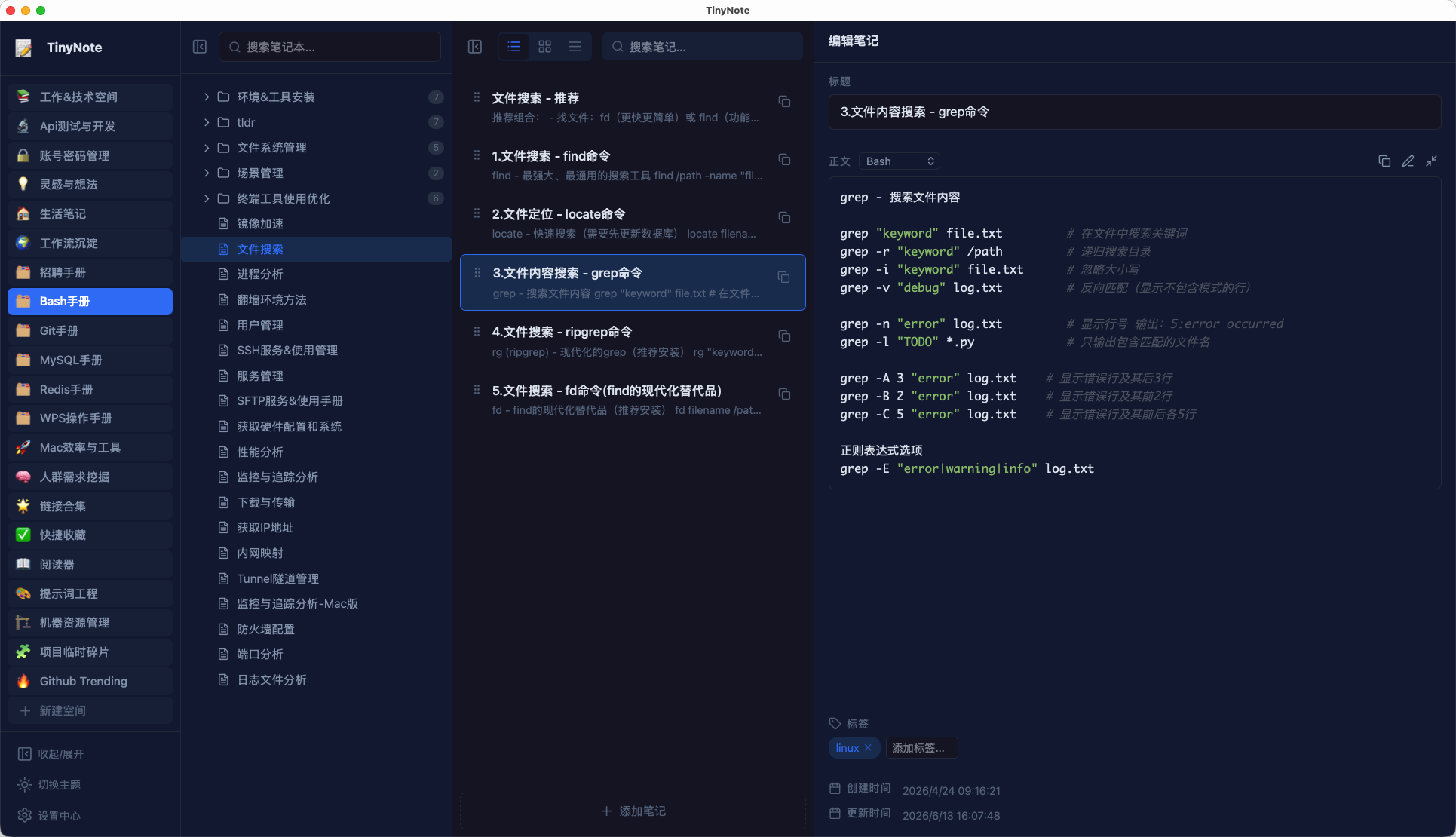
Clear division: App bar, Directory, Notes list, and Inspector. Optimized for desktop multitasking in light and dark themes.
Three note formats
Block notebooks for copyable snippets, Markdown notes for whole documents, and article notes for WYSIWYG writing. All stay as local files.
AI chat
Talk to OpenAI-compatible models inside the app. Keys stay on this device and are never written into the note library.
Multi-host Git and sample library
GitHub, Gitee, GitLab, Alibaba Cloud Codeup, AtomGit, and official TinyNote Git. Import the starter library on first launch.
Clean & Modern, Light & Dark
Four-column layout with clear separation: App Bar, Directory, Notes, and Inspector
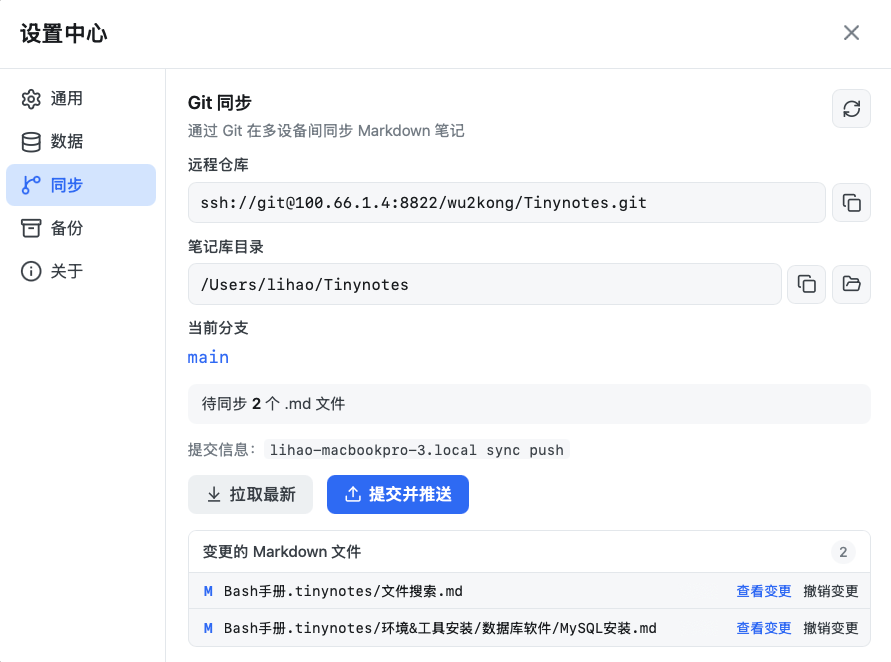
Sync & Backup, Double Protection
Your notebook is a Git repository ready for remote sync, plus one-click local archive backups.
Your Notebook is a Git Repository
Initialize your notes directory as a Git repo to pull, commit, and push directly from the app. Includes changed file lists, diff previews, and single-file rollback for seamless multi-device sync.
- View remote repository and branch details
- One-click Pull / Push with automatic commit messages
- File diff preview and single-file rollback
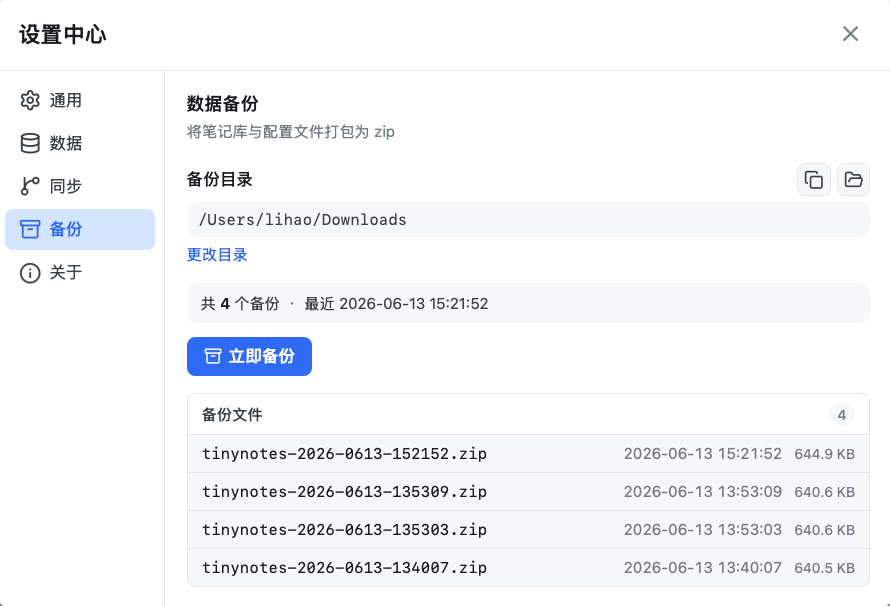
One-Click Archive, Restore Anytime
Package your notes library and configuration into an archive with one click. Clear history with file sizes and dates for complete peace of mind.
- Custom backup storage directory
- Archives notes library and configuration files together
- Backup list with timestamps and file sizes
Free for Basics, One-Time Purchase for Pro
Core note taking and copying are free forever. Upgrade to Pro when you need unlimited spaces, writer notes, and Git sync.
Payment Successful
Your License Key is shown below and has also been sent to your email.
Open TinyNote → Settings → Pro → Paste key to activate. Supports up to 3 devices.
Free
Great for daily snippet management
- Up to 5 spaces
- Up to 100 notes per space
- One-click copy, search, themes
- Local Markdown files & backup
Pro
Unlock professional workflows
- Unlimited spaces & notes
- Create article / writer notes
- Git sync in Settings
- Cross-platform · Up to 3 devices
Not Another Notion, but a Different Productivity Path
TinyNote focuses on high-frequency retrieval of fragmented snippets. It complements long-form note apps and cloud docs rather than replacing them.
| Dimension | Traditional Note Apps | TinyNote |
|---|---|---|
| Product Positioning | Long-form writing, team wiki, knowledge base (e.g., Notion, Evernote, OneNote) | Fast management and quick copying of commands, code snippets, and config templates |
| Content Format | Document-oriented long rich-text pages focusing on formatting and prose | Block-oriented short snippets, each independently copyable |
| Retrieval Method | Open note → Scroll down → Highlight text → Copy (multiple steps, breaks flow) | Search & locate → One-click copy, no selection needed, built for instant use |
| Install & Launch | Installers typically 100MB+, noticeable launch and sync delays | Installer ~5–10MB, instant launch, local-first with immediate response |
| Data Storage | Cloud-dependent proprietary formats; offline support varies | Plain local Markdown files matching disk folders, Git-manageable, open with any editor |
| Organization | Notebooks / tags / backlinks, emphasizing knowledge graphs and connections | Spaces → Directories → Notes → Blocks, reflecting folder hierarchy for rapid lookup |
| Typical Scenarios | Meeting minutes, project docs, study notes, team wikis | Shell command cheat sheets, API snippets, prompt templates, credentials memo, DevOps scripts |
Compare with popular note apps
Longer write-ups live in the help center, so searches like “TinyNote vs Notion” can land on a dedicated page.
When Traditional Notes Fit Better
When you need long-form writing, embedded tables, multi-user comments, or complex knowledge graphs, Notion or Obsidian remain great choices. TinyNote is not meant to replace them.
When TinyNote Fits Better
When you repeatedly copy commands, JSON snippets, or API URLs every day, and want quick structured access without selecting text in long documents. That's the exact pain point TinyNote solves.
Rapid Iteration Around High-Frequency Needs
TinyNote is driven by real developer workflows—Git sync, local backup, multiple view modes, and source mode all stem from daily snippet management needs. Open-source and actively maintained; feedback and suggestions on GitHub Issues are always welcome.
Start Organizing Your Snippets Today
Core features are free forever. Upgrade to Pro with a one-time purchase—no subscriptions.